Assign issues to AI agents, not just people
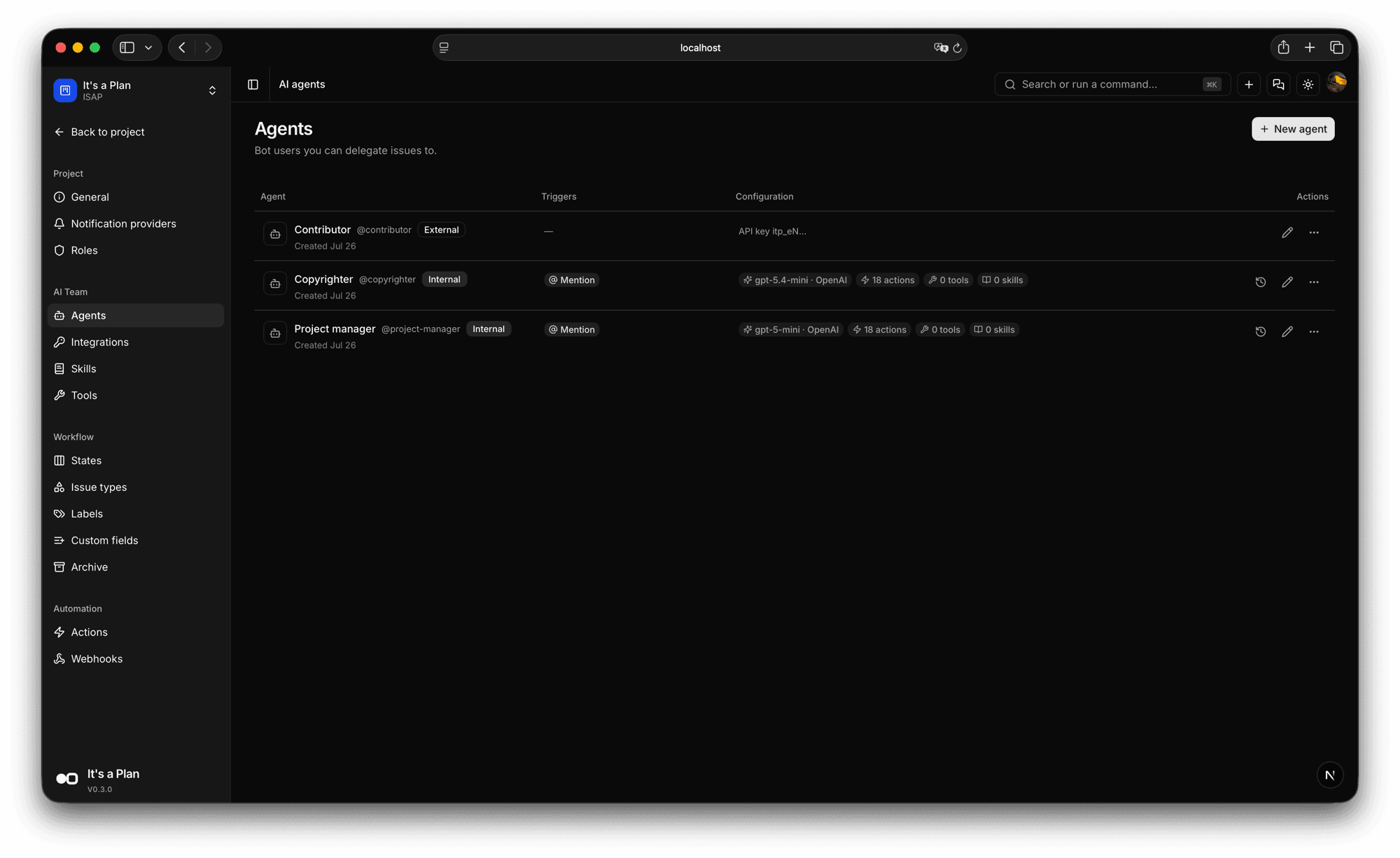
An AI agent in It's a Plan (itsaplan.dev) is a project member with its own @username. You pick the model it runs on, tick what it may do, and hand it the skills and tools for the job. Delegate an issue to it or mention it in a comment, and it works the same board as everyone else. When the work needs your repo, a runner on your machine takes the agent's tasks and gives them to Claude Code, Codex or another CLI you already have. The keys are yours, and every run happens inside your instance.
Three ways to hand work over
Set the delegate on an issue: the agent does the work, the assignee stays the person answerable for it. Mention the agent in a comment and it replies in the thread. Or open the chat in the corner and ask it something on the spot. Everything it does shows up under its own name.
- A delegate field, next to the assignee
- Mention @agent in a comment
- Chat with an agent from any screen
On the issue
Properties
In a comment
Activity
In the chat
Copyrighter
@copyrighter
Chat with Copyrighter
Send a message to test how this agent replies and which tools it uses.
Standing tasks on a schedule
Give an agent a task and say when it runs: every day at nine, every Monday, or a cron you write. The list shows when it runs next and how the last run went, and you can pause one without deleting it.
- Daily, weekly or a cron you write
- Next run and last run in the list
- Pause it, or read the run history
Schedules
Run recurring agent tasks automatically. Schedule times use UTC.
3 schedules
New schedule| Task | Agent | Schedule | Next run | Last run | Actions |
|---|---|---|---|---|---|
Daily task review | Triage bot | Every day at 9:00 AM UTC | Jul 17, 2026, 9:00 AM UTC | Succeeded Jul 16, 2026, 9:00 AM UTC | |
Weekly roadmap check | Planner | Every Monday at 9:00 AM UTC | Jul 20, 2026, 9:00 AM UTC | Succeeded Jul 13, 2026, 9:00 AM UTC | |
Release notes draft | Writer | Every Friday at 4:00 PM UTC | Jul 17, 2026, 4:00 PM UTC | No runs yet |
Choose an agent, describe the task, and set when it should run.
Name
Agent
Task
The agent receives this task on every run.
Schedule (UTC)
Set an agent up like a hire
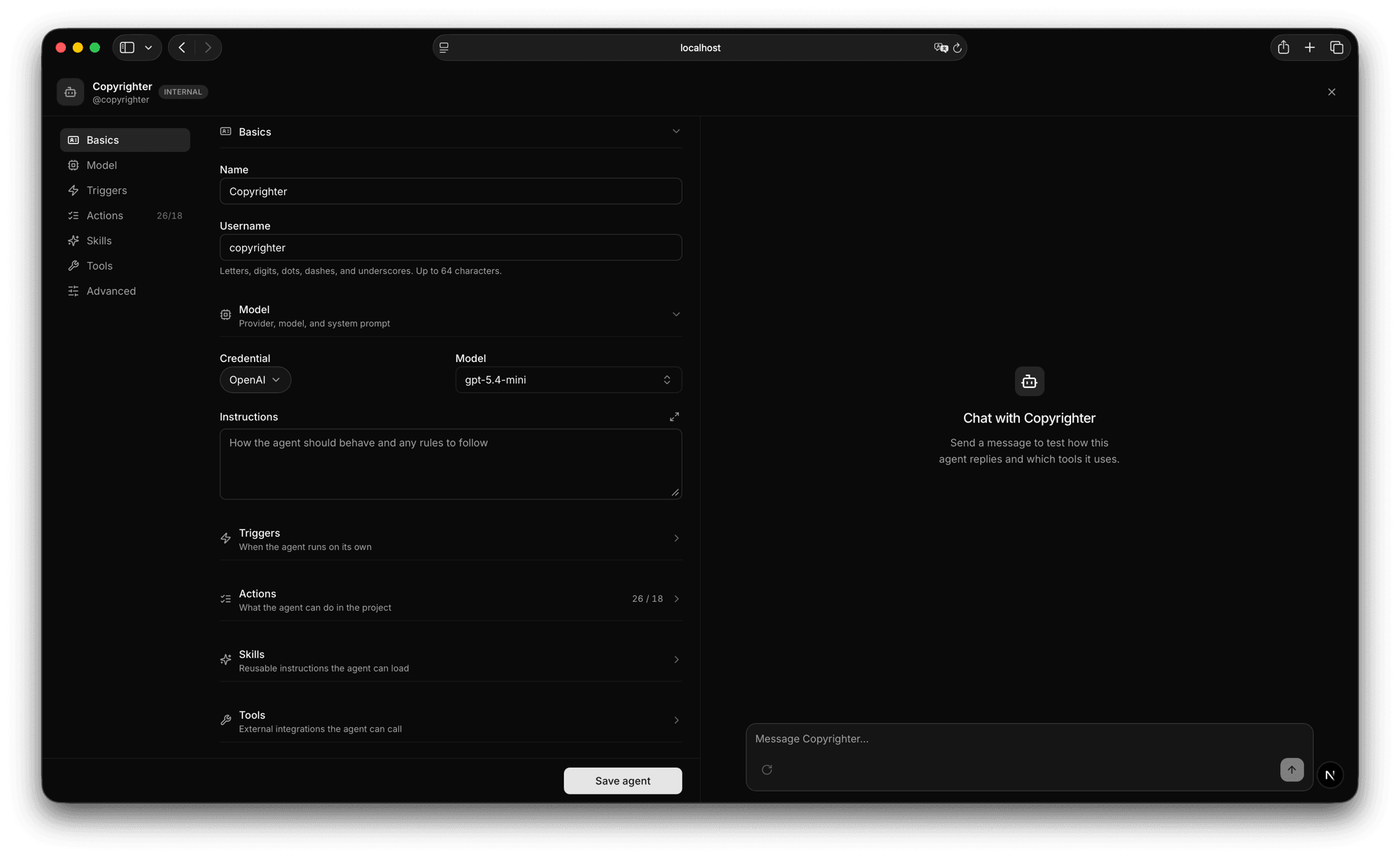
Name it, give it a @username, pick the model from a credential you added earlier, and write the instructions it follows. Then work down the list: what makes it run on its own, what it may do in the project, which skills and tools it can reach. The chat on the right replies straight away, so you fix the wording before anyone else meets the agent.
- Credential and model per agent
- Triggers, actions, skills, tools
- Try it in the chat before saving
Skills it loads when it needs them
A skill is a markdown file: the instructions, plus any reference files the agent may open. Write one here, upload a file you already have, or point at a public GitHub repo and pull in the whole set. Skills belong to the project, and an agent loads one only when the task calls for it.
- Write, upload, or import from GitHub
- SKILL.md plus reference files
- Shared by every agent in the project
SKILL.md
---
name: My skill
description: What it does and when to use it
---
Instructions
Name (optional)
Tools it can call
Pick tools from the catalogue: crawl a site, pull data out of pages, send a Telegram message, publish a post. Each one runs on a credential you added, and shows the scopes it needs before you add it.
- A catalogue of ready tools
- Each tool on your own credential
- Scopes shown before you add it
Tools the agent can call, each one on a credential you added.
Firecrawl Crawl
Follow links from a starting URL and scrape each page to markdown. Returns the pages found.
Firecrawl Extract
Pull structured data out of pages. Pass a JSON schema to fix the output shape.
Telegram Send Message
Send a text message to a Telegram chat through a bot.
Threads Publish Post
Publish a new post with text or media. Returns the media id and permalink.
Or run it on your own machine
Some work needs your repo checked out and your own tools installed. Make the agent external and it gets a runner instead of a model: a process on your machine that hands its tasks to your coding agent. Your code never leaves the machine.
- One command: npx -y @itsaplan/runner
- One config file: the URL, the agent key, the CLI
- Or claim the same tasks over the API, from your own script
MKT-42 importer
Aug 20
Release notes for 0.9
Aug 19
Flaky test in checkout
Aug 18
What is left in the backlog?
Aug 18
Frontend Developer
@frontend-developer·Online
MKT-42: the importer drops rows past 10k. Take it in the repo.
11:15 PMReproduced it in ~/work/my-repo. The batch loop stops at the first empty page. Fixing it now.
Running on your machine · claude
$ cat itsaplan-runner.json
{
  "url": "http://localhost:3000",
  "apiKey": "itp_JA…",
  "agent": "claude",
  "cwd": "~/work/my-repo"
}

$ npx -y @itsaplan/runner
running claude, polling every 3000ms, up to 1 at once
MKT-42: started (delegation)
MKT-42: success
$ The coding agent you already use
Name the CLI in the config file. The runner writes the command itself: the flags for an unattended run, the session to resume, the output it reads back. Anything else runs as your own command, with the task on stdin.
- Five CLIs, no flags to look up
- Chat replies stream while the CLI works
- Your own command for anything else
Coding agent
Name one in the config file. The runner builds the command.
Anything else
Set command instead. Your command gets the task on stdin.
Each chat keeps its own local session
Every conversation gets its own session of the coding agent on the runner's machine, so the context stays with the chat you are in. Switch chats and you switch sessions. The header shows the session id: copy it and open the same session in your terminal, with every tool call the agent made.
- One session per conversation
- The session id, copyable from the chat header
- Resume that session in your own terminal
Local session id
The session the agent's runner keeps on its own machine. Resume it there to read the full transcript with its tool calls.
$ claude --resume 8f2c1d94-6b03-…The rest of it
Provider and model
Pick the credential and the model each agent runs on. Keys are stored encrypted.
Instructions
Write the prompt the agent follows, in plain language.
Triggers
What makes the agent run on its own, like a mention in a comment.
Actions
Tick what it may write: create issues, change states, comment, set labels.
Runners
An external agent's tasks run on your own machine, through the coding agent CLI you already have.
Run history
Open an agent and read what it did on each run.
Start planning
on your own terms
Self-host it today and have your team tracking work by tonight.